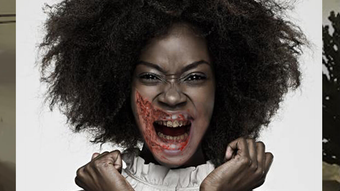

Transform Your Face into a Zombie
Overview
Zombie Camera is a lifestyle application designed for iPhone users seeking a fun and interactive way to embrace the Halloween spirit. Developed by liu Wang, this free app enables users to transform their facial features into realistic zombie appearances using face recognition technology. The primary purpose of the software is entertainment, specifically tailored for holiday-themed photo sharing and social engagement. It is ideal for casual users, especially those looking to create playful or spooky content for social media, personal use, or festive gatherings.
The app allows users to select from over 50 zombie-themed visual effects, each offering a unique interpretation of the undead aesthetic. After applying a transformation, users can add custom text to their images, enhancing personalization and creative expression. The resulting photos can be shared directly through popular platforms such as Facebook, Twitter, email, and messaging apps, streamlining the process of connecting with friends and family. This seamless integration supports spontaneous content creation during Halloween celebrations, making it a convenient tool for users who want to participate in seasonal trends without complex editing.
While the developer did not provide additional details about the app’s underlying technology or performance behavior, the core functionality appears focused on simplicity and accessibility. The application is intended for casual use, emphasizing enjoyment over advanced editing capabilities. Its targeted audience includes individuals who enjoy lighthearted digital experiences and value quick, shareable results during festive periods.
Key Features & Capabilities
- Face Recognition Transformation – Automatically detects the user’s face and applies a zombie aesthetic in real time, ensuring a seamless and realistic effect without manual adjustments.
- 50+ Zombie Visual Effects – Offers a diverse library of pre-designed zombie appearances, allowing users to choose from various styles, from gory to grotesque, to match their mood or theme.
- Text Customization – Enables users to overlay personalized text on their transformed images, supporting creative messaging such as Halloween greetings or humorous captions.
- Direct Social Sharing – Provides integrated sharing options to platforms like Facebook, Twitter, email, and messaging apps, allowing instant distribution of created content.
- Simple User Workflow – Designed for one-tap access to core functions, minimizing the learning curve and maximizing enjoyment for non-technical users.
These features collectively support quick content creation during seasonal events. For example, a user might capture a selfie during a Halloween party, apply a zombie filter, add a caption like “I survived the night,” and share it with friends within seconds. The app’s focus on automation and integration reduces friction between creation and distribution, making it well-suited for spontaneous, social experiences.
User Interface, Workflow & Performance
The user interface of Zombie Camera is structured around simplicity and immediacy, aligning with its entertainment-focused design. The main screen presents a camera view with intuitive controls for capturing and transforming images. Navigation is minimal, relying on a central capture button and clearly labeled options for accessing effects and sharing tools. This streamlined layout ensures that users can begin creating content without confusion or delays.
Workflow efficiency is a key strength. The face recognition technology activates automatically upon opening the camera, eliminating the need for manual alignment or complex settings. Once a photo is taken, users can immediately apply a zombie effect, add text, and proceed to share the result. This linear process supports rapid iteration and encourages repeated use during events or gatherings.
Performance observations are based on general software behavior patterns. The app operates within the constraints of a mobile platform, and its performance may vary depending on device conditions. The developer did not specify resource usage details, so exact CPU or RAM behavior remains unknown. However, given its size of 50.7 MB and focus on real-time image processing, it is expected to function smoothly on modern iPhone models. Stability is presumed to be consistent with standard iOS applications, though no specific reports on crashes or freezes were provided.
Compatibility & System Requirements
Zombie Camera is designed exclusively for the iPhone platform. It is compatible with devices running the latest supported version of iOS, though specific OS version requirements were not listed by the developer. The application requires approximately 50.7 MB of storage space for installation, which is relatively modest for a mobile app with image processing capabilities.
Exact system requirements were not listed. This includes details about minimum processor speed, RAM, or camera specifications. Compatibility information is limited to the platform, and no details were provided about hardware dependencies such as front-facing camera quality or processing power. Users are advised to ensure their device meets standard iOS app requirements to avoid potential issues during installation or use.
Pros and Cons
Pros
- Free to download and use with no hidden costs
- Intuitive interface designed for quick, one-step photo transformation
- Over 50 zombie effects for diverse creative expression
- Real-time face recognition enhances realism and ease of use
- Direct sharing options to major social platforms improve user engagement
Cons
- No information on minimum system requirements or device compatibility beyond iPhone
- Performance behavior under varying conditions was not specified
- Limited to iPhone platform with no cross-device availability
- Features are focused on entertainment, lacking advanced editing tools
- Text customization options may be basic and not fully customizable
FAQ Section
Is Zombie Camera available for Android devices?
Zombie Camera is currently available only for iPhone users. There is no official version for Android or other platforms.
Does the app require an internet connection to function?
The app can operate offline for capturing and applying filters. However, sharing photos through social media or messaging apps requires an active internet connection.
Is the app safe to use?
Zombie Camera is developed by liu Wang and distributed through official channels. As with any app, users should ensure they download it from trusted sources to maintain security.
How often are updates released?
Update frequency was not specified by the developer. Users may receive updates automatically through the App Store when available.
Can I use Zombie Camera without creating an account?
Yes, the app does not require registration or account creation. All features are accessible immediately upon installation.
Final Thoughts + CTA
Zombie Camera delivers a focused, entertaining experience tailored for Halloween enthusiasts and casual users who enjoy playful photo transformations. Its core strength lies in effortless face recognition, a diverse selection of zombie effects, and seamless sharing functionality—all without requiring user accounts or payment. While it lacks advanced editing tools and detailed system information, it excels in simplicity and immediate gratification.
For individuals looking to add a spooky twist to their holiday celebrations, this app offers a reliable and accessible solution. It’s particularly suited for families, friends, and social media users who value fun, shareable content during seasonal events. The free model further enhances its appeal as a low-risk, high-reward tool for festive expression.
Download Zombie Camera now







